

Accessibility is a fundamental requirement for designing technologies that are truly useful. It means developing products and services that can be used by the widest possible range of people, regardless of age, physical, sensory or cognitive abilities and the environment in which they are used.
In public transportation, smart cities and high-traffic environments, this principle takes on a tangible meaning: everyone should be able to access information, navigate spaces, use interactive kiosks and board public transport easily, independently and safely.
For FIDA, making Digital Signage, Passenger Information and Transportation solutions accessible means designing customized and reliable systems capable of reducing informational and physical barriers through an effective combination of hardware, content, user interfaces and assistive technologies.
Why is accessibility essential in transportation and public spaces?
In a railway station, bus stop, airport or intermodal hub, information must be immediate and easy to understand. Passengers need to quickly identify where to go, which service to take, how long they have to wait and whether any service disruptions or changes are affecting their journey.
When information is difficult to see, hard to interpret or available in only one format, it becomes a barrier. A visual-only display may not be sufficient for blind or visually impaired users; a kiosk installed at an unsuitable height may be difficult to use from a seated position; the gap between the platform and the train may prevent passengers with reduced mobility from boarding independently.
Accessibility therefore encompasses the entire passenger experience: from understanding information and interacting with devices to physically accessing public transport.
What makes a Digital Signage solution truly accessible?
A Digital Signage solution becomes truly accessible when the device, content and installation environment are designed as a single, integrated system. The key elements to consider include:
- adequate brightness for the installation environment;
- high contrast between text, background and graphic content;
- font sizes appropriate for the viewing distance;
- a clear visual hierarchy;
- concise, easy-to-understand and up-to-date content;
- easily recognizable icons;
- multilingual support where international travelers are expected;
- intuitive touch interfaces, where applicable;
- integration of audio systems or Text-to-Speech (TTS) technology;
- continuous system operation and easy maintenance.
Accessible design must also take into account real operating conditions. For example, a display installed at an outdoor bus stop must remain clearly readable in direct sunlight, rain, changing temperatures and high-traffic environments. Likewise, an interactive kiosk should be designed with the appropriate screen height, ergonomic principles, an intuitive interface and accessibility for wheelchair users.
From this perspective, accessibility goes beyond what is displayed on the screen—it also concerns how users access information. This is why technologies such as Text-to-Speech (TTS), integrated audio systems, ergonomically designed kiosks and solutions for Persons with Reduced Mobility (PRM) are essential components of a broader approach: creating a user experience that is more independent, inclusive and safe.
Text-to-Speech: Making Information Accessible to Those Who Cannot Read It
Text-to-Speech (TTS) is a technology that automatically converts written text into spoken audio. When integrated into Passenger Information Systems, it allows users to listen to the information displayed on a screen instead of reading it.
This functionality is particularly important for blind and visually impaired users. When arrival times, destinations, service updates or passenger information are available only in a visual format, a display can become a barrier. Text-to-Speech overcomes this limitation by making the same information accessible through speech synthesis.
In the context of public transportation, TTS can be used to communicate:
- arrival and departure times;
- destinations;
- service announcements;
- route changes;
- emergency information;
- wayfinding and navigation guidance.
FIDA’s e-paper solutions can integrate Text-to-Speech (TTS) functionality, typically activated via a dedicated push button installed on the bus stop pole or near the display. This enables users to request an audio reading of the displayed information, providing more independent access to essential travel information.
In addition, FIDA is ready to integrate compatible audio systems across its entire product portfolio, extending this functionality to other types of displays, outdoor totems and interactive kiosks, according to the specific requirements of each project.
E-Paper Displays and MDS: Why Are They Ideal for Bus Stops, Smart Cities and Public Information?
E-paper displays are ideal wherever information needs to be highly readable, easy to update and energy efficient. Thanks to their excellent visibility, even in direct sunlight, they are well suited for bus stops, smart city applications, urban environments and public information points, where clear communication must be maintained despite challenging environmental conditions.
From an accessibility perspective, readability is a fundamental requirement. Clearly visible and well-structured information helps users navigate more easily, particularly in environments where information must be consulted quickly and where lighting and weather conditions can change throughout the day.
The MDS Smart Bus Information Display has been designed with these same requirements in mind. It is a 32-inch outdoor smart bus information display featuring up to 2,500 nits of brightness, PCAP touchscreen technology and the ability to integrate additional features such as USB charging, environmental sensors, audio systems and Text-to-Speech (TTS).
These capabilities make it an ideal solution for public transportation environments where information must be clear, highly visible and easily accessible. At an urban bus stop, for example, the display can provide real-time updates on arrivals, destinations, delays and service announcements, improving the passenger experience while reducing uncertainty during the journey.
Accessible Kiosks: Why Ergonomics and User Interaction Matter
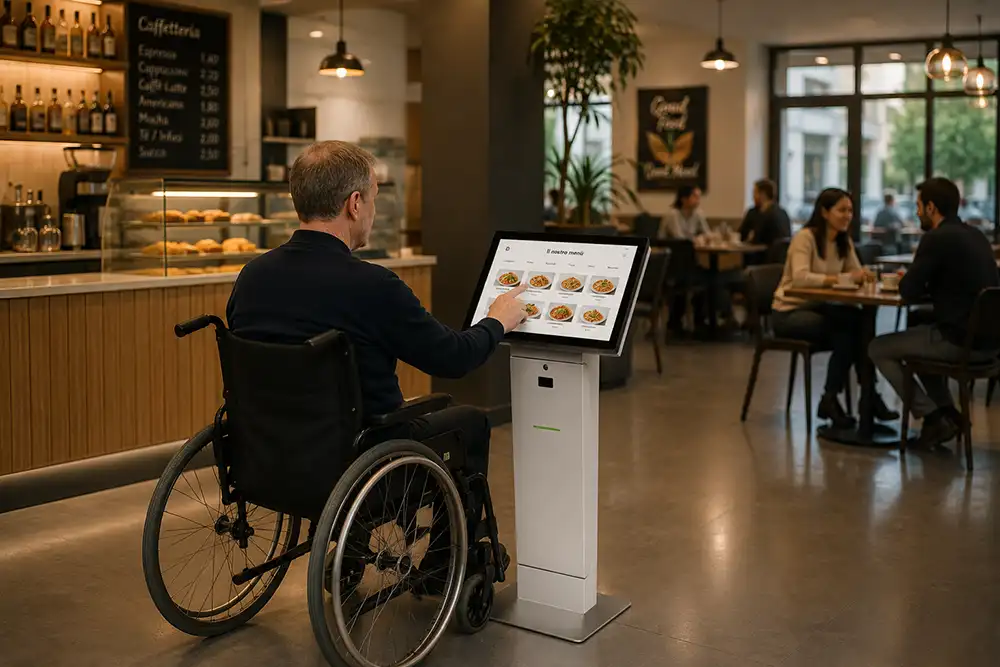
An accessible kiosk should be easy to use for people with different physical abilities. Screen height, ergonomic design, touchscreen positioning and a clear user interface are all essential elements in delivering a truly inclusive user experience.
The TKI is FIDA’s multifunctional interactive kiosk, designed for self-service and information applications. It can be used to access information, purchase services, perform self check-in, support wayfinding and manage a wide range of other interactive applications.
With the TKI, accessibility is not treated as an afterthought but as an integral part of the design process from the very beginning. The product’s dimensions, screen height and ergonomic design enable wheelchair users to comfortably access the touchscreen and interact with the interface without barriers.
This is particularly important in airports, railway stations, public spaces, hospitality venues, retail environments and any location where users are expected to complete tasks independently. A kiosk may incorporate advanced technology, but if it cannot be easily reached or used by everyone, it risks excluding part of its audience.
The FIDA portfolio also includes other interactive solutions, such as TWI for wayfinding, 3D maps and multimedia content, and TSK and TKT for self-service applications, ordering, payments and guided interactions. Each solution can be tailored to the specific installation environment, functional requirements and user experience objectives of the project.
PRM Solutions: Overcoming Physical Barriers in Rail Transportation
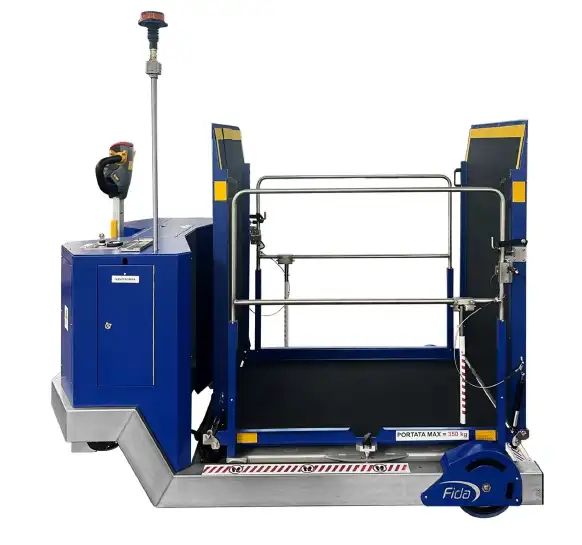
PRM solutions are designed to support Persons with Reduced Mobility (PRM) when accessing public transport. In the railway sector, they help address one of the most significant physical barriers: the gap between the platform and the train.
PRM stands for Persons with Reduced Mobility. The term includes not only wheelchair users, but also older adults, people with temporary mobility impairments, pregnant women and anyone whose mobility may be limited.
In many railway stations, a height or horizontal gap between the platform and the train can make independent boarding difficult or even impossible. To ensure a more accessible travel experience, dedicated boarding assistance devices are required to enable passengers to board and disembark safely.
FIDA offers PRM lifting systems designed to help railway operators assist passengers with reduced mobility during boarding and alighting. These solutions help eliminate a tangible physical barrier while improving safety, independence and service quality.
In this context, accessibility extends beyond visual or digital communication to include the physical travel infrastructure itself. Clear passenger information, assistive technologies and dedicated mechanical solutions must work together to create a more inclusive and accessible transportation experience.
Device, Content and Context Accessibility: What’s the Difference?
To evaluate an accessibility solution as a whole, it is useful to distinguish between three complementary levels:
Device Accessibility
This refers to the hardware and functional characteristics of the solution, including display quality, brightness, durability, touchscreen technology, protective features, sensors, optional audio modules or Text-to-Speech (TTS) capabilities, and reliable operation in both indoor and outdoor environments.
Content Accessibility
This concerns the way information is written, structured and updated. Accessible content should be clear, concise and well organized, allowing users to identify the most important information immediately without having to interpret complex messages.
Context Accessibility
This relates to the environment in which the solution is installed. Factors such as installation height, viewing angle, reading distance, pedestrian traffic, lighting conditions, physical obstacles, crowd density and weather conditions can all have a significant impact on the overall effectiveness and accessibility of the system.
Accessibility and Regulations: Why Compliance Alone Is Not Enough
Regulations and guidelines provide an important framework, but accessibility should first and foremost be considered a design principle. The objective is not simply to comply with legal requirements, but to create systems that are genuinely useful, intuitive and accessible in the environments where they will be used.
According to the European Commission, the European Accessibility Act (EAA) aims to improve the functioning of the internal market for accessible products and services by reducing barriers created by differing regulations across EU Member States. In the European railway sector, the PRM TSI (Technical Specification for Interoperability relating to Persons with Reduced Mobility), issued by the European Union Agency for Railways (ERA), defines the accessibility requirements applicable to the rail system for persons with disabilities and persons with reduced mobility. Meanwhile, the Web Content Accessibility Guidelines (WCAG), developed by the World Wide Web Consortium (W3C), provide internationally recognized guidance for creating digital content that is more perceivable, operable, understandable and robust.
These frameworks are valuable references, but compliance should always be assessed on a project-by-project basis, taking into account the intended application, target market, installation environment, content, functionality and the responsibilities of the stakeholders involved.
For FIDA, accessibility is not limited to a single product—it is a principle that guides the development of every digital solution, from mechanical design to the integration of assistive technologies. Audio systems, ergonomic user interfaces, high-readability displays, e-paper technology and solutions for Persons with Reduced Mobility (PRM) are all part of a broader commitment to creating more inclusive railway stations, bus stops, airports and public spaces.
| Accessibility Need | Design Principle |
| Make information accessible to users who cannot read it | Integrate audio systems or Text-to-Speech (TTS) where appropriate |
| Improve readability in outdoor environments | Use high-brightness displays or display technologies that remain readable even in direct sunlight |
| Facilitate navigation in complex environments | Design clear and intuitive digital wayfinding systems |
| Ensure kiosks can also be comfortably used while seated | Consider screen height, ergonomic design and touchscreen accessibility |
| Simplify self-service interactions | Create simple, guided and intuitive user interfaces |
| Support Persons with Reduced Mobility (PRM) in railway transportation | Provide dedicated boarding assistance devices to support safe boarding and alighting |
| Adapt technology to the installation environment | Assess the installation context, pedestrian flows, lighting conditions, installation height, viewing distance and environmental factors |
FAQ – Frequently Asked Questions
What does accessibility mean in Digital Signage?
Accessibility in Digital Signage means designing communication systems that are easier to read, understand and use for the widest possible audience. It includes factors such as contrast, brightness, display positioning, clear content, intuitive user interfaces, audio or Text-to-Speech (TTS) capabilities where required, and timely information updates.
Why is Text-to-Speech important in Passenger Information Systems?
Text-to-Speech (TTS) converts the information displayed on a screen into spoken audio. It is particularly valuable for blind and visually impaired users, allowing them to access timetables, destinations and service announcements without having to read the display.
Are e-paper displays a good solution for improving accessibility?
Yes. E-paper displays are well suited to many outdoor environments thanks to their excellent readability, even in direct sunlight, and their extremely low power consumption. They are particularly effective for smart bus stops, smart city applications and public information points.
What makes an interactive kiosk accessible?
An interactive kiosk is more accessible when it can be comfortably reached and used by people with different physical abilities. Screen height, ergonomic design, touchscreen positioning and an intuitive user interface are all key factors in ensuring an inclusive user experience.
What does PRM mean in railway transportation?
PRM stands for Persons with Reduced Mobility. The term includes wheelchair users, older adults, people with temporary mobility impairments, pregnant women and anyone whose mobility may be limited.
Does FIDA develop customized accessibility solutions?
Yes. FIDA designs and manufactures customized Digital Signage, Passenger Information and Transportation solutions. Every project can be tailored according to its installation environment, operational requirements and the informational or functional needs of its users.
Accessibility as Part of Innovation
Innovation creates value when it improves people’s lives. In public transportation, smart cities and high-traffic environments, designing accessible technologies means making information clearer, reducing barriers and enabling more independent, safer and inclusive user experiences.
FIDA works alongside transport operators, public authorities and technology partners to develop Digital Signage, Passenger Information and Transportation solutions tailored to real-world operating environments. If you would like to discuss the most suitable solution for your project, contact the FIDA team.